
E4Effort1.7.0 - App Store
You'll be able to see results in few seconds.
Publisher Description
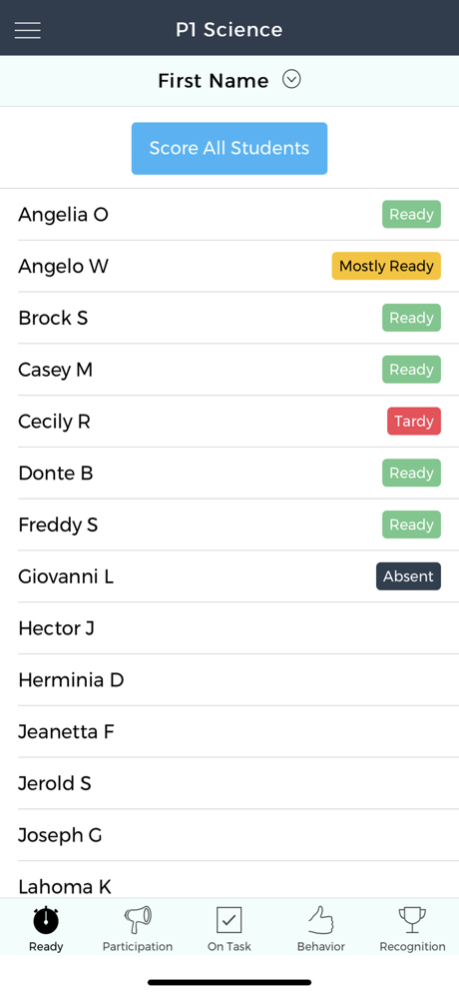


With E4Effort, students learn what it feels like to put forth consistent effort and take more responsibility for their own learning. Emphasizing effort facilitates positive classroom management, higher student confidence, and improved learning outcomes. (Go to E4Effort.com for more information.)
E4Effort has three main parts and an optional paperless Rewards Program:
1) The EFFORT SCORING APP
That provides four different categories to measure effort:
• READY: arriving on time, with supplies
• PARTICIPATION: paying attention in class
• ON TASK: staying focused on assignments or activities
• BEHAVIOR: proper conduct based on class and school expectations
(For greater specificity, teachers may create “Subcategories.” For example, “Respectful” as a subcategory of BEHAVIOR)
The Effort Scoring App also has a RECOGNITION category that allows teachers to select students for Effort Awards and badges. Each Effort Award includes 6, 8, or 10 Effort Shares (explained below).
2) Individual STUDENT PORTALS
That allows:
• Easy access to eight types of effort data
• Tracking of Effort Shares and Achievement Badges
• Students to assign “Guardian” portals to family members
• Students to redeem their Effort Shares
3) The TEACHER DASHBOARD
That provides:
• Monitoring of individual and whole-class trends
• Editing of student scores
• Formation of Course, Student, and Term features
• Adjustable Category Weights
• Communication via “Behavior Comments” sent to individual or multiple student portals
• Creation of “Buyback” offerings to allow students to redeem their Effort Shares
• Organization and fulfillment of student Buyback redemption requests
REWARDS PROGRAM
Students are awarded effort points known as “Effort Shares” in two ways: 1) with badges when students earn Effort Awards and 2) automatically when students meet or exceed 5-day category milestones. Effort Shares may be thought of as:
• Bonus points having no real value,
• Bonus points that may be used to replace assignments,
• A school or class currency. Teachers set up “Buyback” offerings (often privileges or school supply items) that students may redeem from their student portal. Student redemption orders are electronically sent to Teacher Dashboards to allow reward record keeping to be easier and paperless. Go to E4Effort.com/Buybacks to see examples.
The E4Effort System was designed by a teacher with help from other teachers and developers. The beta version was tested over several academic years. If you have any questions or comments, contact support@e4effort.com.
Jul 8, 2021
Version 1.7.0
Two new options for the Recognition category: 1) organize student list in ways other than random (e.g., alphabetical by first name), 2) raise or lower how many Effort Shares are given with Gold, Silver, and Bronze Effort Awards.
About E4Effort
The company that develops E4Effort is E4Effort Inc.. The latest version released by its developer is 1.7.0.
To install E4Effort on your iOS device, just click the green Continue To App button above to start the installation process. The app is listed on our website since 2021-07-08 and was downloaded 0 times. We have already checked if the download link is safe, however for your own protection we recommend that you scan the downloaded app with your antivirus. Your antivirus may detect the E4Effort as malware if the download link is broken.
How to install E4Effort on your iOS device:
- Click on the Continue To App button on our website. This will redirect you to the App Store.
- Once the E4Effort is shown in the iTunes listing of your iOS device, you can start its download and installation. Tap on the GET button to the right of the app to start downloading it.
- If you are not logged-in the iOS appstore app, you'll be prompted for your your Apple ID and/or password.
- After E4Effort is downloaded, you'll see an INSTALL button to the right. Tap on it to start the actual installation of the iOS app.
- Once installation is finished you can tap on the OPEN button to start it. Its icon will also be added to your device home screen.
Program Details
System requirements
Download information
Pricing
Version History
version 1.7.0
posted on 2021-07-08
Jul 8, 2021
Version 1.7.0
Two new options for the Recognition category: 1) organize student list in ways other than random (e.g., alphabetical by first name), 2) raise or lower how many Effort Shares are given with Gold, Silver, and Bronze Effort Awards.
Disclaimer
Official App Store Link
We do not host E4Effort on our servers. We did not scan it for viruses, adware, spyware or other type of malware. This app is hosted by Apple and passed their terms and conditions to be listed there. We recommend caution when installing it.
The App Store link for E4Effort is provided to you by apps112.com without any warranties, representations or guarantees of any kind, so access it at your own risk.
If you have questions regarding this particular app contact the publisher directly. For questions about the functionalities of apps112.com contact us.
